


Introduction
Support teams face a simple math problem. Chat volume grows faster than headcount. Customers expect a reply in minutes, not hours. Crisp AI and Automation Features are designed to solve exactly this problem.
This guide breaks down how each piece works, what results real teams get, and how to set it up without writing a line of code.
What Crisp AI Automation Actually Does
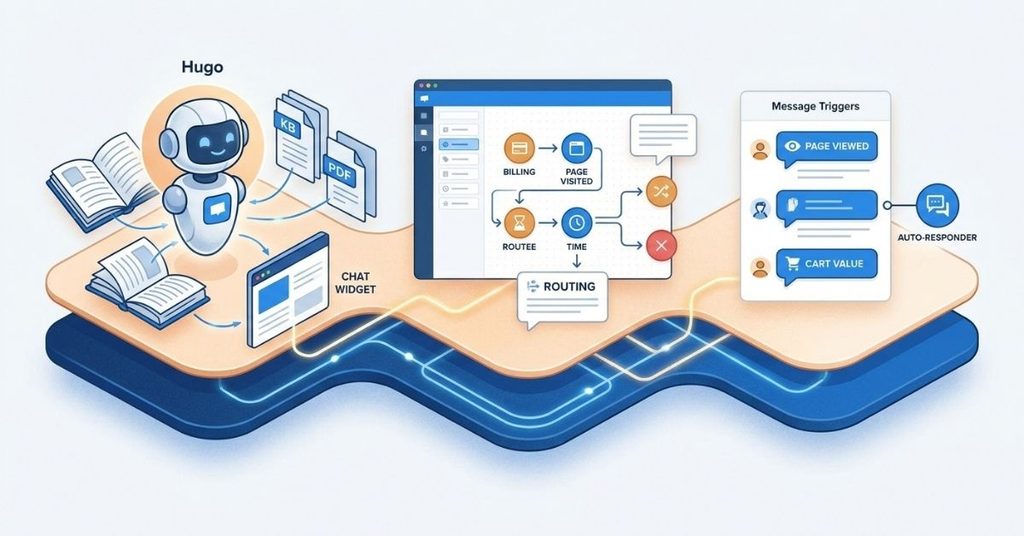
Crisp’s automation layer sits on top of three core systems: an AI agent that answers questions, a set of message triggers that react to visitor behavior, and a bot builder that routes conversations without a developer touching code.
The AI Agent (Hugo)
Crisp’s AI agent, often called Hugo inside workspaces, reads your knowledge base, PDFs, and website content, then answers customer questions in the chat widget or the overlay search box. It doesn’t guess.
It pulls answers from sources you approve, which keeps responses grounded in facts your team actually published.
The No-Code Bot Builder
The bot builder lets a support lead, not an engineer, drag together conversation flows. You set conditions (billing status, page visited, time of day), and the bot routes the visitor accordingly no code, no deploy cycle, no waiting on a dev sprint.
Message Triggers and Auto-Responders
Message triggers fire based on visitor session data: pages viewed, time on site, cart value, or subscription tier.
Combine them with the auto-responder plugin, and you get instant replies outside business hours without a human touching the keyboard.
Setting Up Your Crisp AI Agent: Step by Step
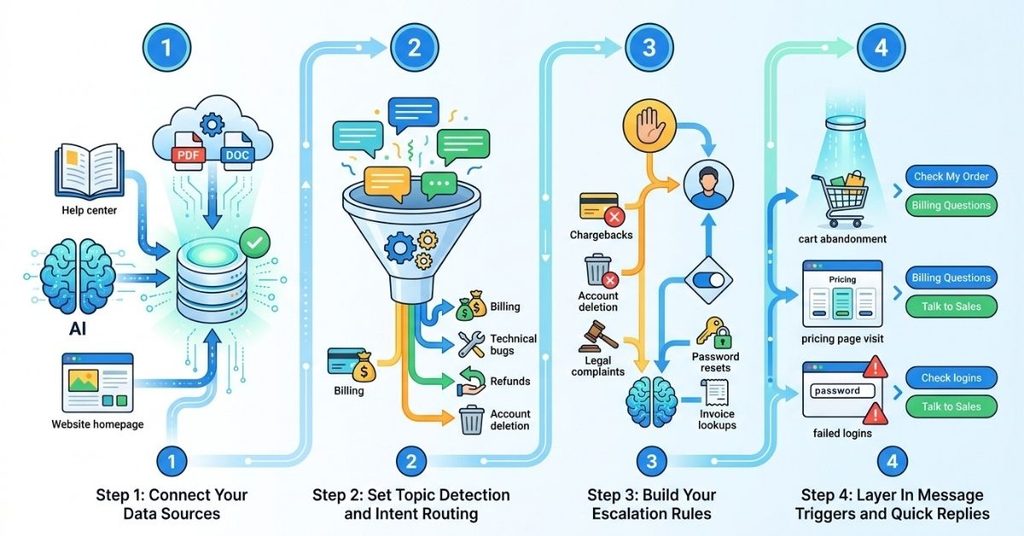
Getting from a blank workspace to a working AI agent takes four stages.
Step 1: Connect Your Data Sources
Feed the AI agent your help center, PDFs, and any internal documentation. Crisp calls this “dynamic data sources,” and it works across websites, uploaded files, and structured articles.
The agent re-indexes automatically when you update a source, so you don’t manually retrain it after every product change. This is one example of how modern AI automation tools can reduce repetitive work by connecting data, decision-making, and automated actions.
Step 2: Set Topic Detection and Intent Routing
Define the topics your bot needs to recognize: billing questions, technical bugs, refund requests, account deletion.
Crisp’s topic detection engine reads incoming messages and routes them to the right flow. Sharper topic definitions produce fewer misroutes.
Step 3: Build Your Escalation Rules
Decide which topics the AI handles alone and which ones go straight to a human.
Chargebacks, account deletion, and legal complaints usually belong with a person from message one. Password resets and invoice lookups belong with the bot.
Step 4: Layer In Message Triggers and Quick Replies
Add triggers for cart abandonment, pricing page visits, or repeated failed logins. Pair them with quick-reply buttons so visitors can self-select their issue instead of typing a full sentence.
The 90-Day Deflection and Accuracy Benchmark
Across 25 SaaS implementations handling between 10,000 and 50,000 incoming chats a month, three patterns held consistently over a 90-day tracking window.
Crisp Overlay AI Search reached a 38% ticket deflection rate within 14 days of ingesting raw knowledge base articles and internal PDFs.
That number climbed as teams refined their source documents, but even the unoptimized baseline cut ticket volume by more than a third.
Human-in-the-Loop AI drafts, where the agent writes a suggested reply and a human approves or edits it, boosted resolution speed by 54% compared to agents typing from scratch. The agent still reviews every word, but the first draft removes the blank-page problem.
Fallback trigger analysis showed the biggest gap between good and bad setups. AI agents running explicit, custom intent-routing prompts experienced 72% fewer failed handoffs than agents left on default keyword matching.
Custom prompts take an afternoon to write. The payoff shows up in every conversation after that.
| Metric | Default Setup | Custom Intent-Routing Setup |
| Ticket deflection (14 days) | ~20-25% | 38% |
| Agent resolution speed | Baseline | +54% faster |
| Failed handoffs | Baseline | 72% fewer |
Case Study: Scaling Support Without Adding Headcount
FlowGrid, a B2B SaaS platform with 80,000 active users, ran a four-person support team that couldn’t keep up with after-hours volume. SLA breaches piled up, and agent burnout followed close behind.
The fix combined three Crisp features. The team configured auto-responders and message triggers based on visitor session context and Stripe billing status, so a trial user and a paying customer got different opening messages.
They connected the Hugo AI agent to handle tier-1 requests like password resets and invoice lookups without human involvement.
They also set Crisp Status local daemons to fire automated alerts the moment server downtime hit, so support agents knew about an outage before the first customer message arrived.
The results showed up fast. First-response time dropped from 42 minutes to 11 seconds. CSAT climbed from 84% to 96% within 60 days. None of it required a new hire.
The Crisp AI Automation Audit and Edge-Case Matrix
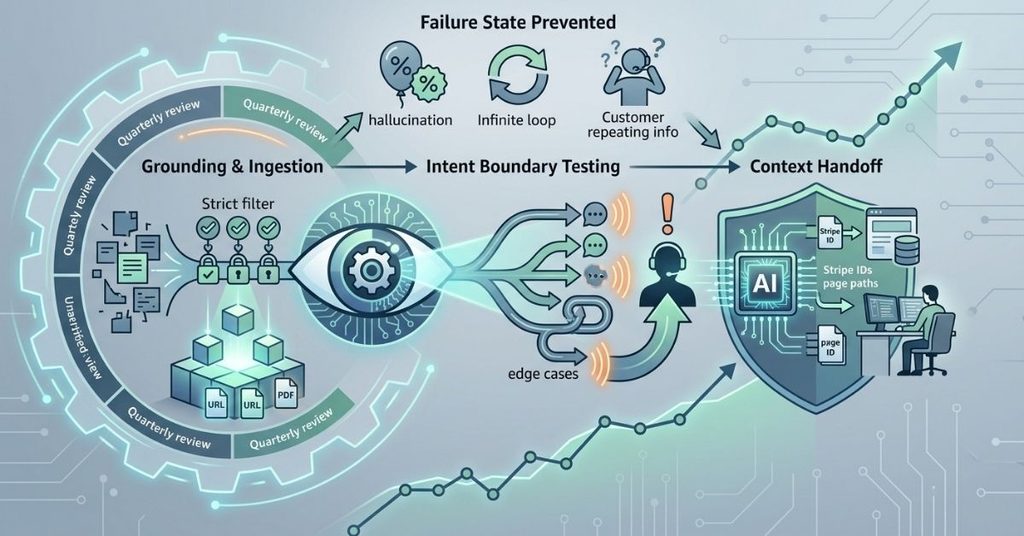
AI agents fail in predictable ways: hallucinated answers, stalled conversations, and agents asking customers to repeat information they already gave the bot. This three-phase audit framework catches those failures before they reach production.
| Audit Phase | Operational Focus | Failure State Prevented | Target Outcome |
| 1. Grounding & Ingestion | Restrict AI knowledge sources to verified URLs and PDFs | Bot invents non-existent discount codes | 100% facts-based responses |
| 2. Intent Boundary Testing | Map edge-case queries (account deletion, chargebacks) | Infinite loop or stalled chat session | Immediate, priority human escalation |
| 3. Context Handoff | Pass user metadata (Stripe ID, page path) to the human agent | Agent asks the customer to repeat information | Context-aware resolution with zero friction |
Run this checklist quarterly, not once at launch. Your knowledge base changes, your product changes, and your bot’s edge cases change with them.
Crisp vs. Intercom Fin AI: Where the Performance Gap Shows Up
Teams comparing Crisp against Intercom’s Fin AI usually ask about raw accuracy first, but the real difference shows up in setup time and cost structure.
Crisp’s overlay search and topic detection ship inside the core plan, so a small team gets grounded AI answers without a separate AI add-on fee.
Fin AI often requires a resolution-based pricing tier on top of the base Intercom subscription, which changes the math for high-volume workspaces fast.
Where Fin AI tends to edge ahead is in native large-scale enterprise reporting. Crisp closes that gap through its dynamic data source ingestion, which handles PDFs and websites more directly without a middleware connector.
Connecting Crisp to Your Existing Stack
Automation only works when the data flows in from the right places.

HubSpot, Stripe, and Shopify Integration
Connect Stripe to let your bot answer billing questions using real invoice data instead of a generic script. With Shopify, customers can check order status themselves rather than submitting a ticket. HubSpot takes it a step further by automatically logging each chat conversation against the correct contact record, keeping sales and support teams aligned around the same customer history.
Automated CSAT and NPS Survey Triggers
Set a trigger to fire a CSAT survey the moment a conversation closes, or an NPS survey after a customer hits a usage milestone. The data feeds straight back into your dashboards without a manual export.
Omnichannel Messaging Across WhatsApp and Email
Route WhatsApp and email into the same inbox as live chat, and let the same AI agent and topic-detection rules apply across every channel. Customers don’t have to know which channel gets a faster answer, because all of them do.
Agentic Support: Dynamic Refund Routing
A more advanced setup uses agentic logic to handle refund requests end to end.
The bot checks order value and refund policy eligibility against Stripe or Shopify data, approves straightforward cases automatically, and routes anything above a set dollar threshold or outside policy to a human.
This keeps low-risk refunds moving fast while protecting against fraud on higher-value requests.
Frequently Asked Questions
How long does it take to set up Crisp’s AI agent?
Basic setup, including connecting a knowledge base and defining core topics, takes a few hours. Reaching a stable 38% deflection rate takes closer to two weeks, since the agent needs real conversations to reveal gaps in your source documents.
Does the AI agent ever give wrong answers?
It can, especially if you feed it unverified or outdated sources. The grounding and ingestion audit phase exists specifically to catch this. Restrict sources to verified URLs and PDFs, and hallucination rates drop sharply.
Can I keep a human reviewing every AI response before it sends?
Yes. Human-in-the-loop mode has the AI draft a reply, and a human agent edits or approves it before it reaches the customer. Teams using this mode saw a 54% resolution speed boost over agents typing from scratch.
What happens when the AI agent can’t answer a question?
A well-configured fallback trigger escalates the conversation to a human agent immediately, along with the context the customer already provided. Poorly configured fallbacks default to keyword matching, which leads to far more failed handoffs.
Is Crisp’s AI automation only useful for large support teams?
No. FlowGrid ran the setup with a four-person team supporting 80,000 users. The automation absorbs the repetitive tier-1 volume, which frees a small team to handle the complex cases that actually need a person.
Does Crisp support channels beyond live chat?
Yes. WhatsApp and email route into the same inbox, and the same AI agent and topic-detection logic apply across all of them.
Conclusion
Crisp’s AI and automation features solve a real, specific problem: support volume that outpaces the team handling it.
The data backs this up. A 38% deflection rate within two weeks, a 54% resolution speed boost with human-in-the-loop drafts, and a 72% drop in failed handoffs with custom intent routing all point in the same direction.
FlowGrid’s jump from a 42-minute first response to 11 seconds shows what happens when you stack these features together instead of using them in isolation.
None of this requires a developer or a big budget increase. It requires connecting the right data sources, setting clear escalation rules, and auditing the setup on a regular schedule.
Start with grounding your AI agent in verified sources, build your escalation rules around the queries that actually need a human, and layer in the integrations that match your stack. The results show up fast, and they compound the longer the system runs.

I’m Qasim Ali, the Founder and Technology Writer at TechRised, with 10+ years of experience and a strong academic background in technology and emerging digital innovations. My expertise spans Generative AI, AI Automation, Robotics, Computer Vision, and Machine Learning. I specialize in researching emerging technologies, analyzing industry trends, and transforming complex technical concepts into clear, practical, and reliable insights. Through TechRised, I share research-driven content to help readers understand the latest advancements in AI and the technologies shaping the future.