


Introduction
Walk into any large grocery chain today, and cameras watch more than shoplifters. They track empty shelves, flag misplaced stock, and count foot traffic throughout every aisle.
This is retail AI vision automation, and it is increasingly reducing the need for repetitive manual store audits by turning camera footage into real-time operational data.
This guide breaks down how the technology works, where it can deliver measurable operational value, and how retailers can address shopper privacy when deploying it at scale.
What Retail AI Vision Automation Actually Means
Retail AI vision automation combines cameras, edge processors, and computer vision models to read the physical state of a store in real time. The system doesn’t just record video. It interprets it.
A camera captures a shelf, and a computer vision model analyzes the image to identify product gaps, misplaced items, and other visible shelf conditions. When the system detects an issue, it can generate an alert or task for store staff.
Three technologies work together here:
- Computer vision models that detect and classify objects on shelves and at checkout points.
- Edge computing hardware that can process video locally inside or near the store, reducing the amount of raw video that needs to be transmitted and enabling faster responses for time-sensitive use cases.
- Analytics dashboards that turn detection events into restock alerts, heatmaps, and shrinkage reports.
Retailers use this stack for four main jobs: automated checkout, shelf monitoring, loss prevention, and store layout analysis.
The Aisle-Accuracy Framework: Benchmarking Vision Models on Real Shelf Data
Most vendors benchmark their models in a lab. Labs have even lighting and clean product placement. Store aisles have neither.
That gap matters. A model that performs well in a controlled test can perform substantially worse on a real store floor when lighting changes, packaging creates glare, or products partially block one another.
To evaluate models more realistically, teams can use evaluation metrics that account for the conditions found on an actual store floor rather than relying on laboratory accuracy alone.
One way to build a more realistic evaluation framework is to combine detection accuracy with store-specific factors such as lighting variation, product occlusion, shelf density, and shelf-position accuracy. For this article, we can call that proposed framework the Frame-to-Inventory Precision Index (FIPI).
Unlike a single laboratory accuracy score, FIPI would evaluate whether a vision system continues to identify products and shelf conditions reliably under the conditions it will encounter during an actual store day.

Why Lighting Can Reduce Vision-Model Accuracy
Store lighting shifts constantly. Morning sun through a storefront window behaves nothing like overhead fluorescent tubes at 8 p.m. Product packaging reflects light differently under each source.
Glossy packaging can create reflections that obscure product features, while shadows and changing illumination can make the same SKU look different from one part of the store or day to another.
Testing across both conditions, rather than a single condition, exposes weaknesses that a single-lighting benchmark hides.
Retailers should ask vendors for accuracy scores broken out by lighting condition, not just an averaged number. An average can mask a model that fails badly during evening shifts.
Cloud vs Edge Processing Speed
Processing location changes everything about response time. Sending video to the cloud for analysis introduces network latency in addition to processing time. Running the model on local edge hardware skips that round trip entirely.
| Processing Method | Typical Advantage | Best Suited For |
| Cloud-based processing | Centralized compute and easier large-scale analytics | Batch analysis, centralized reporting, model management |
| Edge-based processing | Lower dependency on network round trips and local processing | Real-time alerts, in-store monitoring, latency-sensitive workflows |
| Hybrid processing | Combines local inference with centralized analytics | Large multi-store deployments |
Actual latency varies significantly with camera resolution, model size, edge hardware, network conditions, and the amount of processing performed.
Retailers should therefore request measured end-to-end latency from the vendor rather than relying on a generic cloud-versus-edge figure.
Explore our Computer Vision insights
Case Study: How Morrisons Uses AI Vision to Improve Shelf Availability
Phantom inventory and out-of-stock products create a difficult problem for grocery retailers: inventory systems can show that a product is available even when the shelf is empty.
Traditional manual gap-scanning can help identify these issues, but it requires store associates to repeatedly walk the aisles and check shelves.
Morrisons, one of the UK’s largest supermarket chains, partnered with Focal Systems to use AI-powered shelf cameras for continuous shelf monitoring.
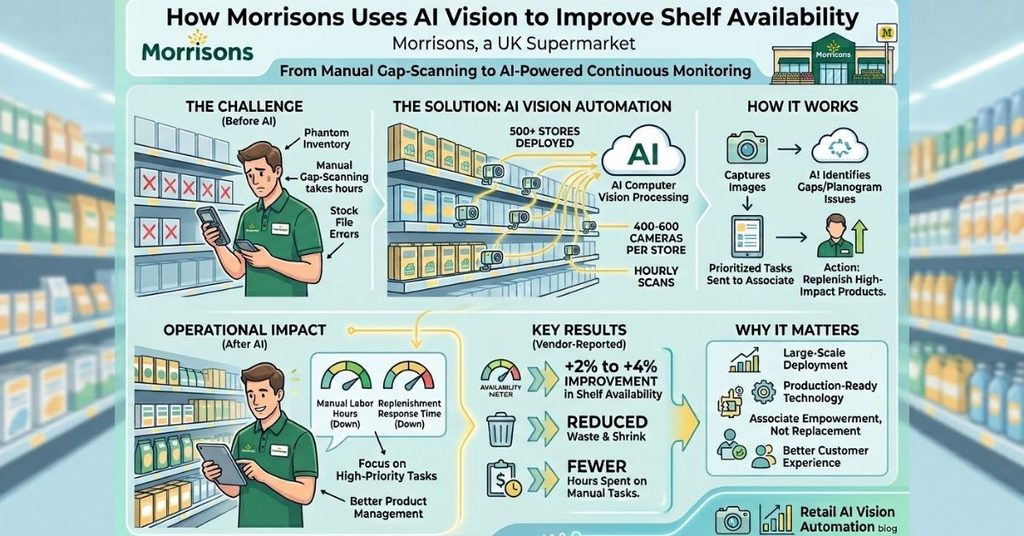
According to Focal Systems, the deployment covered approximately 500 Morrisons stores, with 400–600 cameras per store scanning shelves hourly, and the rollout was completed over six months. [1]
The system uses computer vision to identify shelf gaps, low-stock conditions, and planogram compliance issues. Detected gaps can then be turned into prioritized tasks for store associates, allowing teams to focus on the products that need attention rather than manually scanning entire stores.
What Morrisons Changed
Before the deployment, store teams relied heavily on manual gap-scanning to identify products that needed replenishment. According to Focal Systems, the AI camera system changed this workflow by continuously monitoring shelves and directing associates toward specific replenishment tasks.
Focal Systems also reports that Morrisons CEO Rami Baitiéh said the system reduced in-day replenishment times and positively affected availability, sales, and customer satisfaction.
The deployment also demonstrates why store-specific computer vision can be more useful than a simple inventory report. A stock file can indicate that an item should be available, while a camera can provide an additional view of what is physically visible on the shelf.
From Manual Gap-Scanning to Continuous Monitoring
The operational difference is straightforward. Instead of relying entirely on associates to walk the store and search for gaps, shelf-mounted cameras continuously capture shelf conditions and computer vision models analyze those images.
Focal Systems reports that the Morrisons deployment used hundreds of cameras per store and scanned shelves hourly. The company says the system helped reduce the time associates spent on manual gap-scanning and enabled teams to focus on prioritized replenishment tasks.
Measured Results
Focal Systems reports that the Morrisons deployment produced more than a 2% improvement in customer availability across the store estate, with improvements of up to 4% in top-performing locations.
The company also reports reductions in waste and shrink and fewer hours spent on manual store tasks. These figures are vendor-reported results rather than an independent industry benchmark, so they should be interpreted in that context. [2]
The broader lesson is that retail computer vision does not have to replace store associates. Its more practical role is to reduce repetitive monitoring work and give associates better information about where their attention is needed.
Why This Case Matters
The Morrisons deployment shows what changes when computer vision moves from a controlled pilot into a large grocery estate. The challenge is no longer simply detecting whether a product appears in an image.
The system has to operate across hundreds of stores, different shelf layouts, changing lighting conditions, large product assortments, and thousands of daily operational decisions.
For retailers considering a similar deployment, the key metrics should therefore extend beyond model accuracy.
Availability improvement, replenishment response time, manual labor saved, false-alert rates, inventory accuracy, and the system’s performance across different store conditions are all useful measures of production value.
Privacy-First Visual Architecture: Minimizing Identifiable Data
Cameras in a retail store raise an obvious question: what happens to footage containing shoppers?
A privacy-conscious architecture should minimize the collection, transmission, and retention of identifiable information.
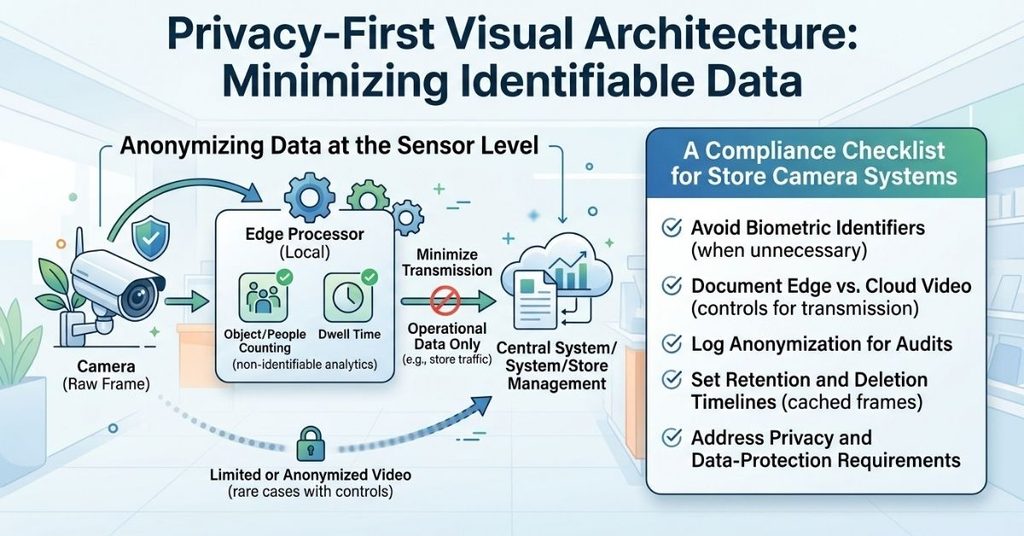
Where shopper identification is not required, edge processing can allow systems to extract operational information locally and limit the amount of identifiable video sent to central systems.
Anonymizing Data at the Sensor Level
The flow works in a specific order:
- The camera captures a raw frame.
- Local edge hardware processes the frame for the required retail task.
- Where identification is unnecessary, the system limits or removes identifiable information before data leaves the local environment.
- The system transmits or stores only the operational data required for the application, subject to defined retention and access controls.
This approach can reduce unnecessary exposure of identifiable imagery, but privacy protection depends on the complete system design, including processing, transmission, storage, access controls, retention, and deletion policies.
A Compliance Checklist for Store Camera Systems
Retailers evaluating a vendor’s privacy claims should check for these points directly:
- The system should avoid creating or retaining biometric identifiers when the retail use case does not require them.
- The architecture clearly documents whether identifiable raw video can leave the local environment and what security controls apply if transmission is necessary.
- The system logs anonymization steps for audit purposes.
- Data retention policies specify a deletion timeline for any temporarily cached frames.
- The vendor should document how its system handles applicable privacy and data-protection requirements, including rules that may apply to biometric data and identifiable imagery.
A vendor unwilling to walk through this checklist in technical detail deserves a second look before signing a contract.
Technology Comparison Table
Hardware choice shapes both accuracy and cost. The table below illustrates several deployment profiles and the factors retailers should consider when choosing hardware for a computer vision system.
| Deployment Profile | Typical Characteristics | Best Fit |
| Entry-level edge setup | Lower-resolution cameras and lightweight inference | Limited shelf monitoring and low-density environments |
| Mid-range edge setup | Higher-resolution cameras with dedicated edge acceleration | General aisle and shelf monitoring |
| High-density vision setup | Multiple high-resolution feeds with stronger local compute | Dense shelves, complex layouts, and multiple simultaneous detections |
| Hybrid setup | Local inference combined with cloud analytics | Multi-store reporting and centralized model management |
There is no universal camera resolution or frame-rate specification for retail computer vision. The right configuration depends on mounting height, field of view, shelf density, product size, lighting, inference frequency, and the specific detection task.
Where Retail AI Vision Automation Is Headed
A few trends stand out for the next phase of adoption:
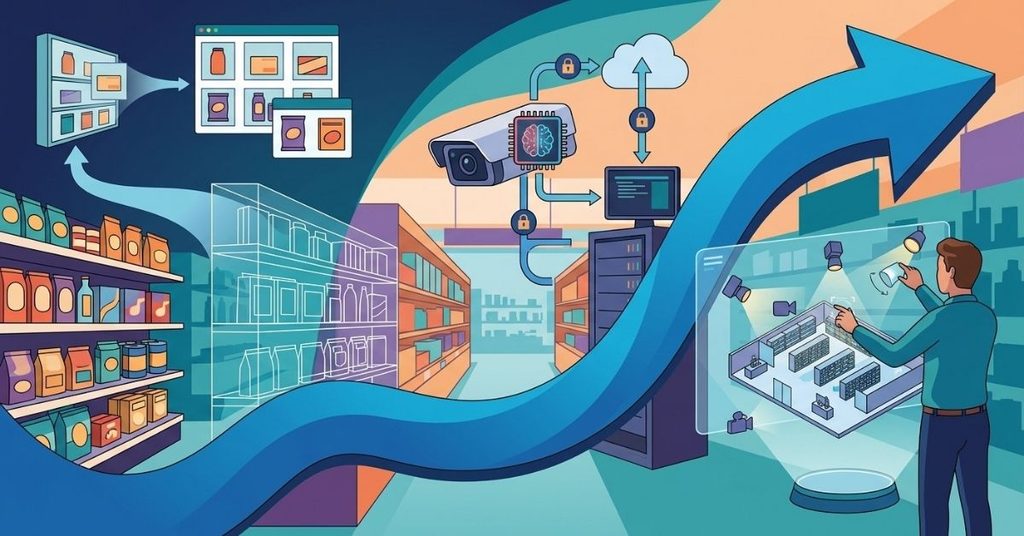
- Synthetic training data can reduce the amount of real-world imagery that needs to be manually labeled, particularly when teams need to simulate new products, shelf layouts, lighting conditions, or rare visual scenarios. It still needs validation against real store imagery.
- On-device processing is becoming more capable as edge hardware improves, allowing more computer vision workloads to run locally without depending entirely on cloud connectivity.
- Interactive planogram tools let store managers simulate camera placement and lighting changes before installing a single camera, cutting deployment guesswork.
The direction is clear: faster processing, less reliance on constant cloud connectivity, and tighter privacy controls built in from the start rather than added on later.
FAQs
What is retail AI vision automation?
It’s the use of cameras and computer vision models to monitor store conditions, shelf stock, checkout activity, and foot traffic, reducing the need for some repetitive manual monitoring.
Does edge processing replace cloud processing entirely?
Not always. Many retailers run a hybrid setup: edge processing for real-time alerts, cloud processing for batch reporting and long-term trend analysis.
How does the system protect shopper privacy?
A privacy-conscious system can process video locally and minimize the transmission and retention of identifiable imagery when shopper identification is not required. The exact protections depend on the system architecture and applicable data-protection requirements.
How Quickly Can You Expect Results After Deployment?
The timeline varies by deployment. A pilot can establish a baseline before full rollout, but measurable business impact depends on camera installation, model validation, store-specific calibration, workflow integration, and staff adoption.
Retailers should define success metrics before the pilot and compare them against a pre-deployment baseline.
What’s the biggest factor in vision model accuracy?
Lighting conditions, product occlusion, camera placement, shelf density, packaging similarity, and changes in product assortment can all affect vision-model performance. Their relative impact depends on the specific model and retail use case. A model tested only in ideal lighting often underperforms on the actual store floor.
Conclusion
Retail AI vision automation turns the store floor into a source of continuously generated operational data rather than relying entirely on periodic manual audits.
The technology works best when retailers demand honest accuracy benchmarks under real store lighting, choose edge processing for time-sensitive alerts, and design privacy controls that minimize the collection, transmission, and retention of identifiable data.
When these three pieces are designed well, retailers can create faster replenishment workflows, improve visibility into shelf and inventory discrepancies, and reduce unnecessary handling of identifiable shopper data.

I’m Qasim Ali, the Founder and Technology Writer at TechRised, with 10+ years of experience and a strong academic background in technology and emerging digital innovations. My expertise spans Generative AI, AI Automation, Robotics, Computer Vision, and Machine Learning. I specialize in researching emerging technologies, analyzing industry trends, and transforming complex technical concepts into clear, practical, and reliable insights. Through TechRised, I share research-driven content to help readers understand the latest advancements in AI and the technologies shaping the future.